 SingRank
robots.txt Census 2026: 1 of 207 Singapore Sites Blocks GPTBot
Contents11
- Key figures
- What robots.txt does, in one paragraph
- What we checked on 219 sites
- 207 of 214 reachable sites serve a real file
- AI crawlers: who blocks them, and who invites them
- Should you block AI crawlers? A decision you can make in one minute
- Nearly half the files are a platform default
- What this means if AI ignores your business
- Method and limits
- Want your file read by a person?
- FAQ
Almost no Singapore service business blocks AI crawlers. In a census of 219 service-business websites across 20 industries, taken on 25 September 2026, 207 of the 214 we could reach served a working robots.txt file, and only 1 of those 207 blocked GPTBot or ClaudeBot.
So if an AI assistant never mentions your business, your robots.txt probably isn't the reason. In this sample it almost never was. That's worth knowing before you pay anyone to "unblock" AI search.
Key figures
- 207 of 214 reachable Singapore service websites served a valid robots.txt file, 25 September 2026.
- Only 4 of the 207 working files shut out any AI crawler, and just 1 shut out GPTBot and ClaudeBot.
- 3 of the 4 blocked only CCBot and Bytespider, neither of which is the crawler ChatGPT uses for search answers.
- 20 of the 207 working files mentioned an AI crawler by name; 16 of those mentioned it only to let it in.
- 196 of 207 declared a sitemap. 91 of 206 files we saved matched the WordPress default pattern, and 5 matched Shopify's.
- 7 reachable sites had no working file: 4 returned "not found", 1 returned an empty response, 1 returned a web page and 1 refused our request.
What robots.txt does, in one paragraph
A robots.txt file is a short text file at the root of a website. Google describes it as the way a site tells crawlers "which URLs the crawler can access", according to Google Search Central. Google adds that "The file must be named robots.txt" and must sit at the root of the site it applies to, per its guide to creating a robots.txt file. AI companies use the same file: each publishes the name its crawler uses, and a site can allow or block each one separately.
What we checked on 219 sites
We picked 20 service trades that people in Singapore hire every day, from aircon servicing to divorce lawyers. For each we ran two searches through SingRank's own metasearch on 25 September 2026 and kept only the websites of businesses that sell the service themselves, up to 15 per trade. Directories, marketplaces, booking platforms and best-of lists were left out.
One of SingRank's own clients came up, and we removed it. That left 219 websites. Our editorial policy explains how we sample and what we never publish.
For each one, our crawler requested /robots.txt with an honest user-agent that names SingRank, and classified the answer:
- valid: a plain-text file with at least one crawl rule or sitemap line;
- absent: a "not found" error;
- empty: a response with nothing in it;
- web page served: an HTML page where the file should be;
- refused: our request was blocked;
- unreachable: a timeout, a certificate error or a dead server.
In every valid file we looked for eight AI crawlers by name: the three from OpenAI (GPTBot, OAI-SearchBot and ChatGPT-User), ClaudeBot, PerplexityBot, Google-Extended, Bytespider and CCBot. A crawler counts as blocked when the file disallows the whole site for it, either in its own rule group or through the catch-all rule when it has no group of its own.
207 of 214 reachable sites serve a real file
Five of the 219 sites could not be reached at all during the census, so the base is 214. Of those, 207 served a valid robots.txt file. Only seven didn't.
The seven that did not break down like this:
| What /robots.txt returned | Sites |
|---|---|
| Not found (404) | 4 |
| An empty response | 1 |
| A web page instead of a text file | 1 |
| Our request was refused (403) | 1 |
A missing file isn't a disaster. The internet standard for robots.txt, RFC 9309, says that "If a server status code indicates that the robots.txt file is unavailable to the crawler, then the crawler MAY access any resources on the server", according to the RFC 9309 text. A site with no file is, in practice, open.
The web page served in place of the file is the more awkward case. It returns a healthy status code, so a checker that only looks at the status passes it. What a crawler actually receives is HTML, not rules.
We found the same thing in our car workshop website study the day before. At this larger scale it turned out to be rare.
AI crawlers: who blocks them, and who invites them
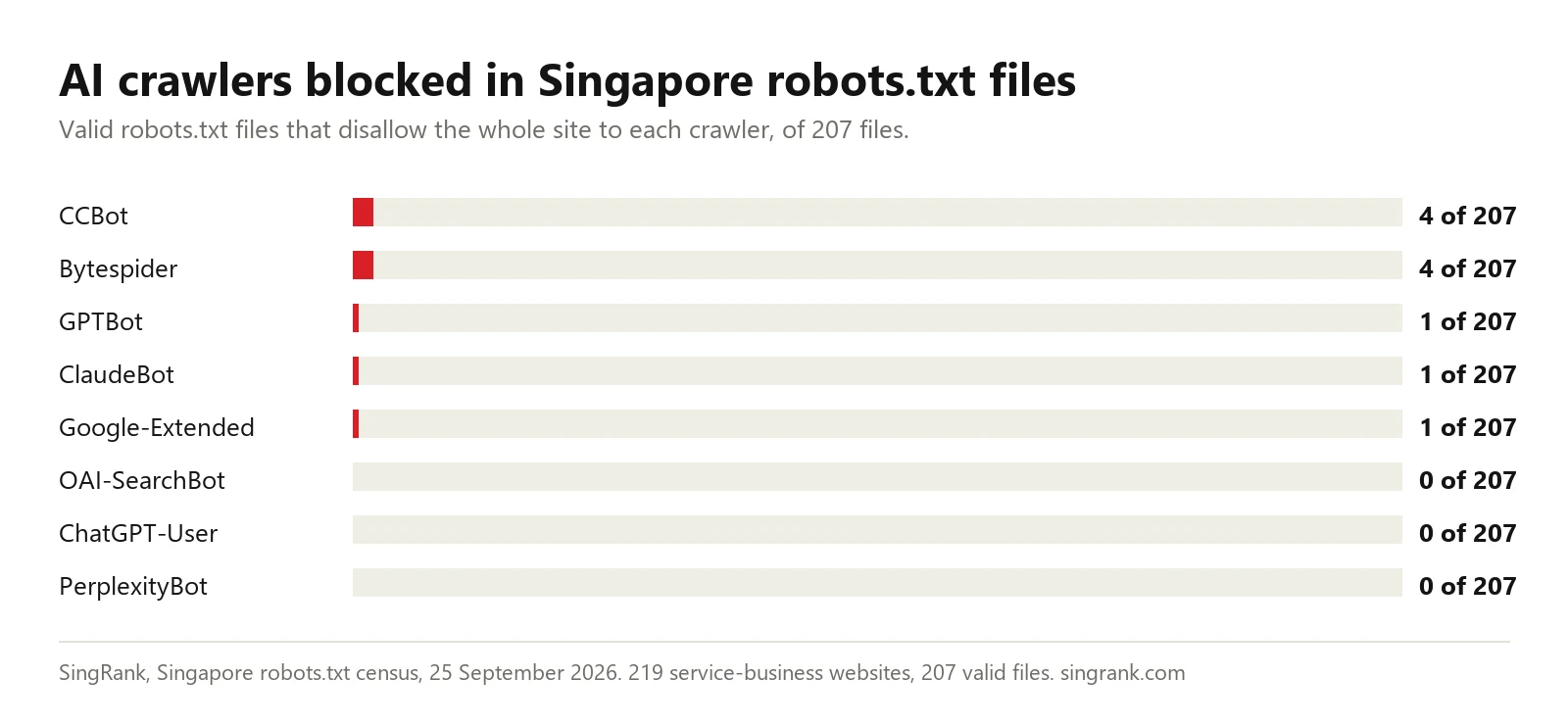
Of the 207 valid files, 4 blocked at least one AI crawler.
| AI crawler | Files blocking it (of 207) |
|---|---|
| CCBot | 4 |
| Bytespider | 4 |
| GPTBot | 1 |
| ClaudeBot | 1 |
| Google-Extended | 1 |
| OAI-SearchBot | 0 |
| ChatGPT-User | 0 |
| PerplexityBot | 0 |
Three of the four blocked only CCBot and Bytespider. CCBot belongs to Common Crawl, which describes its work as "an open repository of web crawl data that is universally accessible and analyzable by anyone", according to Common Crawl. Neither is the crawler behind ChatGPT's search answers, so blocking them doesn't, on its own, keep a site out of those answers.
Only one file, on an electrician's website, blocked the crawlers behind ChatGPT's training (GPTBot), Claude (ClaudeBot) and Gemini training (Google-Extended) together. Even that file did not block OAI-SearchBot.
That distinction matters to you. OpenAI runs separate crawlers for training and for search, and it's explicit that turning OAI-SearchBot away takes a site out of ChatGPT's search results, according to OpenAI's crawler documentation.
Google splits it the same way. It calls Google-Extended "a standalone product token" that lets publishers decide whether their content may be used to train future Gemini models, according to Google's list of common crawlers. Blocking a training crawler and blocking a search crawler are two different decisions.
The more interesting number goes the other way. 20 of the 207 files named an AI crawler at all, and 16 of those named it without blocking it. Those sites went out of their way to welcome AI crawlers by name. No file in the sample blocked everything for every crawler.
This matches our AI search readiness study of 13 September 2026, where none of the local business sites checked blocked AI crawlers. Two samples, two methods, the same answer.
Should you block AI crawlers? A decision you can make in one minute
Many owners in this census never made this decision; their website platform made it for them. If you want to make it on purpose, it helps to split AI crawlers into two jobs.
Crawlers that gather training data. GPTBot collects content that may be used to train OpenAI's models, per OpenAI's crawler documentation. Google-Extended is the token Google gives publishers to say whether crawled content may be used to train future Gemini models.
CCBot builds Common Crawl's open web archive. Blocking GPTBot and Google-Extended tells those two companies not to train on your pages. It doesn't remove you from ChatGPT's search answers, because a different crawler fetches those.
Crawlers that fetch pages for answers. OAI-SearchBot is the one OpenAI uses to surface websites in ChatGPT's search answers, and OpenAI says sites that opt out of it won't be shown there. Block it and you step out of those answers on purpose.
Here's how I'd decide, as a view rather than a rule:
| Your situation | Training and archive crawlers (GPTBot, Google-Extended, CCBot) | Search crawler (OAI-SearchBot) |
|---|---|---|
| You sell a local service and want enquiries | Your call; allowing them costs you nothing we could measure | Allow |
| Your pages are your product (paid guides, original data you sell) | Consider blocking | Allow, if you want to be found |
| You don't want to appear in AI answers at all | Block | Block |
For most of the 219 businesses in this census, the first row applies. They sell a service, not the text on their website, so being read by an assistant is the point.
The stakes are real even for a small site. Take our own numbers.
In the month to 25 September 2026, ChatGPT sent 22 visitors to SingRank's two websites. Eight arrived on one page: the singrank.com price list. Blocking OAI-SearchBot would have put those at risk. Blocking GPTBot wouldn't have touched them.
If you want to block GPTBot and training in general but stay in ChatGPT's search answers, the file can say exactly that. OpenAI's own documentation describes allowing OAI-SearchBot while disallowing GPTBot. A minimal version looks like this:
User-agent: GPTBot
Disallow: /

User-agent: Google-Extended
Disallow: /

User-agent: OAI-SearchBot
Allow: /

User-agent: *
Allow: /

Sitemap: https://[your domain]/sitemap.xml
Only 1 of the 207 files in this census chose to block GPTBot. That's a legitimate choice. It just isn't the reason the other 206 businesses are or aren't being named by an assistant.
Nearly half the files are a platform default
We saved a copy of every valid file and sorted them by the default lines each platform writes.
91 of the 206 we could fetch again matched the file WordPress writes by default, which blocks the admin area and little else. Five more matched the one Shopify writes. That's 96 of 206, just under half. 196 of the 207 declared a sitemap, which most website platforms add automatically.
In other words, nearly half the Singapore service businesses in this census didn't write their robots.txt themselves. Their website platform did, and the platform's default lets AI crawlers in.
What this means if AI ignores your business
If you have asked ChatGPT or Perplexity for the best provider of your service in Singapore and your business was not named, this census suggests where not to start. In 206 of 207 files we read, the crawlers behind ChatGPT, Claude and Gemini training were allowed in, and not one file blocked ChatGPT's search crawler.
So I would check the file once, then move on to the questions that more often decide it:
- Open your domain followed by /robots.txt in a browser. You should see plain text. If you see a web page, an error or a login, fix that first; it takes minutes.
- Check your bot protection separately. A firewall or "under attack" setting can turn crawlers away even when robots.txt allows them. Our guide to checking crawler access before you buy AI visibility shows how. This census did not test that layer.
- Then look at what the page says. Whether it names your service and your area in the first paragraph, and whether it answers the questions buyers ask. Our guide on why AI does not recommend your business covers those checks.
An llms.txt file and the rest of your technical SEO come after that, not before.
Method and limits
We would rather you know exactly what this census can and cannot carry.
- The sample comes from metasearch, not Google. The 40 searches ran through SingRank's self-hosted SearXNG on 25 September 2026. It blends other engines and is not Google's ranking. Most queries returned 10 to 15 results, so the sample is 219 sites, not the 300 we planned. The catering and maid agency searches drew on a different engine mix that day.
- robots.txt only. We did not test firewalls, bot-protection services or server rules. A site can allow a crawler in robots.txt and still block it at the network edge.
- Whole-site blocks only. We counted a crawler as blocked when the file disallows the whole site for it. A file that blocks AI crawlers from some folders only is counted as allowing them.
- One honest crawler. Our requests named SingRank. Some sites may treat other crawlers differently.
- Pattern matching for platforms. The WordPress and Shopify counts come from recognisable default lines in each saved file (a
/wp-admin/rule, a/checkouts/rule), not from checking the platform itself. One valid file could not be fetched a second time, so that count is out of 206. - We name no business. This page describes a sample of websites, not a rating of any company. Our own clients were excluded.
- Dates are UTC. The searches and the fetches all ran on 25 September 2026.
The industry totals are available as a CSV file from the citation box at the end of this page. It contains counts only, no business names.
Want your file read by a person?
Send us your domain. We will open your robots.txt by hand, check it against the crawlers that matter for search and AI answers, and tell you whether it is the problem or not. Usually it is not, and we will say so. It starts as a free visibility check through our contact page.
If you want the work done, our SEO, AEO and GEO programme covers crawler access along with the content that decides whether an assistant names you.
Findings describe 219 websites sampled on 25 September 2026. This page names no business and is not a rating of any company.
FAQ
Do Singapore businesses block AI crawlers in robots.txt?
Very rarely. Of the 207 working files we read on 25 September 2026, 4 shut out any AI crawler and just 1 shut out GPTBot and ClaudeBot. Not one shut out OAI-SearchBot, which is the crawler behind ChatGPT's search answers.
What is the difference between GPTBot and OAI-SearchBot?
GPTBot gathers content OpenAI may train on. OAI-SearchBot finds the pages ChatGPT shows in its search answers. Opting out of the second keeps you out of those answers; opting out of the first doesn't. You can block one and allow the other.
Is it bad if my website has no robots.txt file?
Usually not. Under the robots.txt standard, a crawler that finds no file is free to crawl the site, so no file means an open site to well-behaved crawlers. A web page or an error served in its place is worth fixing.
How do I check my robots.txt?
Type your domain followed by /robots.txt into a browser. You should see plain text with lines such as User-agent, Disallow and Sitemap. If you see your homepage, a login screen or an error, the file is not doing its job.
If my robots.txt is in order, why does ChatGPT not mention my business?
In this census the file was almost never the problem. More common reasons are bot protection that blocks crawlers at the network edge, and pages that do not say clearly what the business does, where, and at what price.
Does blocking GPTBot stop ChatGPT from mentioning my business?
Not by itself. GPTBot feeds OpenAI's training; a separate crawler, OAI-SearchBot, fetches pages for ChatGPT's search answers. You can shut the first out and still let the second in.
In this census, the one file that blocked GPTBot left OAI-SearchBot free. The switch that takes you out of ChatGPT's search answers is OAI-SearchBot, not GPTBot.
Did most Singapore businesses write their own robots.txt?
Often not. 91 of the 206 files we saved matched the pattern WordPress writes by default, and 5 more matched Shopify's. Only 20 of 207 named an AI crawler at all. For nearly half the sites in this census, the website platform wrote the file, and the platform's default lets AI crawlers in.
Can I cite these figures?
Yes. Please cite "SingRank, Singapore robots.txt Census 2026" with a link to this page and the collection date, 25 September 2026. Quote each figure with its base, such as 4 of 207 files, and keep the metasearch caveat. The industry totals can be downloaded as a CSV from the citation box.